
Accounting
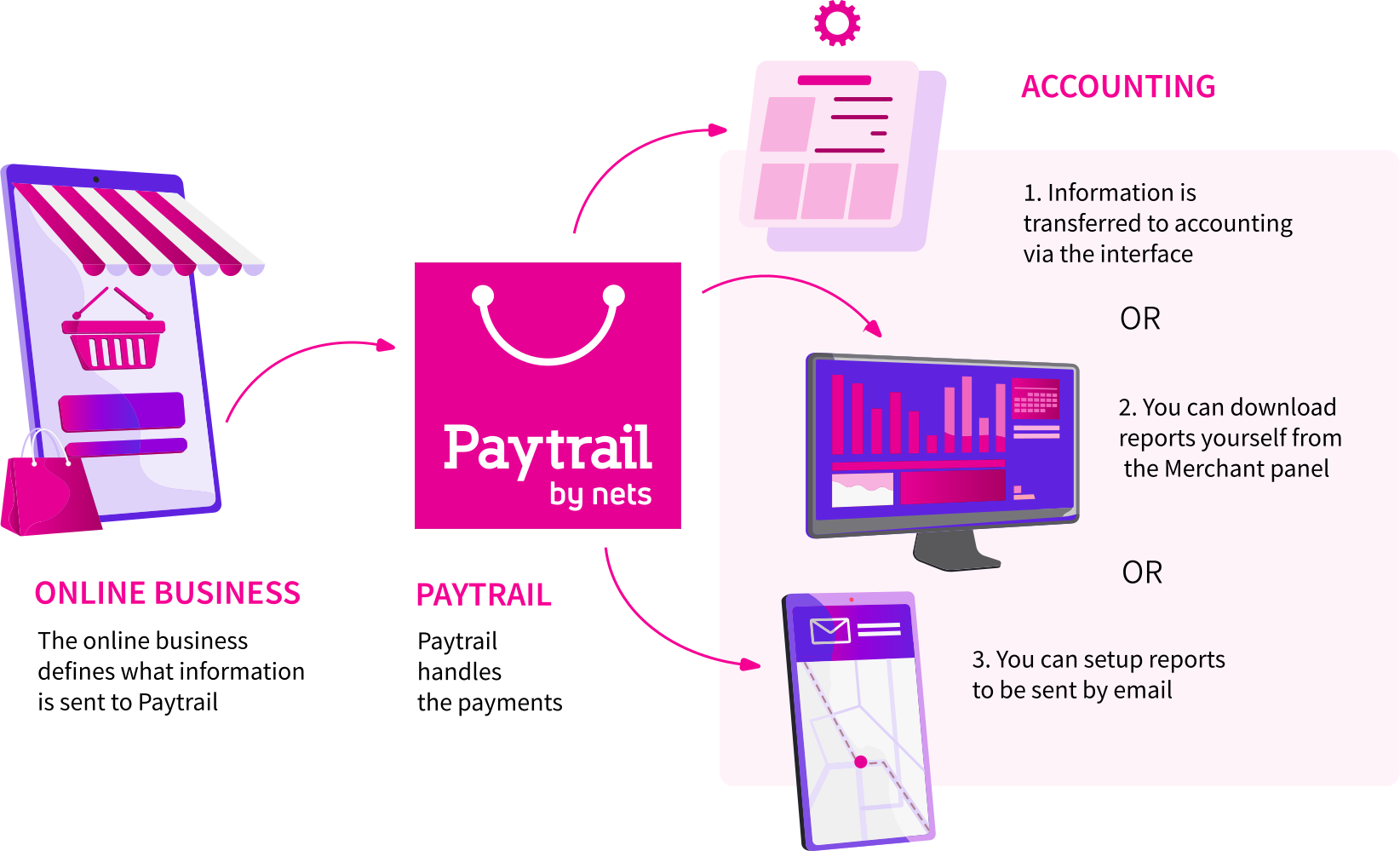
Paytrail's service makes accounting easy. Get the necessary reports from the Merchant panel for yourself or your accountant, or have them automatically sent by email.
Accounting - make your daily life easier
Our service gives you all the information you need for effortless accounting. You can download ready-made reports to share with your accountant, automate report delivery by email, or retrieve account data through our interface.

Data
When a payment is made the data is imported into our system, which can be used to identify payments. We offer a settlement interface to search for payment information (e.g., for accounting or operational planning) before the settlement of payments (payment data) or after the settlement (settlement data).
The payment data can be retrieved immediately after the payment, which means that successful payments can be retrieved in real time.
Our system shows the tax rates on the payment and settlement level since the rates are imported from the online business to Paytrail.
Allocation
We pay out all payments per day as one lump sum. The daily settlement cycle is the default of our system. Other cycles are possible such as weekly or per transaction settlements.
Reconciliation
The settlement interface retrieves the order number (i.e. "Reference") from the online store and the payment identifier, or "Stamp", in the payment data, which can be used for reconciliation. The order number (i.e. "Reference") is sent from the online store to Paytrail's system when the payment is created. The payment identifier, or "Stamp", is a unique identifier created by Paytrail and that is sent back to the online store with the status of the payment. Note: the "orderId" field should not be used.
It is possible to search for payment information in real time as soon as the payment data has been imported into Paytrail's system using either.
Settlement reports
A settlement report of payments and settlements can be downloaded through our system, which helps to allocate transactions.
Settlement reports from the Merchant panel:
- Are created automatically when the settlement has been calculated.
- Can be downloaded in PDF, CSV or XLSX format.
- Can be automatically sent via email to different recipients. You can also choose the format: XLXS, CSV or PDF.
You can also get reports from the merchant interface in json or CSV format.
Accounting automation using the interface
It's possible to automate accounting by retrieving settlement data using the interface.

Frequently asked questions
No, it does not. You can send the same order number on multiple payments. The unique payment identifier is the Stamp which is created Paytrail and sent back to the online business with the status of the payment
- Payment traffic,
- Specific transactions
- Settlements
- Tax rates of payments
Yes you can. Our settlement report contains information about payments and tax rates for product lines brought to us by the online business.
The order number is the information you send from your ecommerce platform to Paytrail. The "Reference" is the name of the field where the order number is sent.
Need help or more information?
Our team of experts is here to support you every step of the way.